
 Vishal Singhal
Newsletter software lets you collect subscribers, write and design an email, send it on a schedule and see who clicked. Which one is best depends on what the newsletter is for. If the newsletter is the product, because you’re a writer or publisher, look at beehiiv, Substack, Ghost or Kit. If it’s one channel for a business that also sells, pick a marketing platform that keeps subscribers on your customer database: CampaignHQ, MailerLite, Mailchimp, Brevo or EmailOctopus.
Last updated: 6 November 2026. We make CampaignHQ, so it is listed first. Every vendor detail below comes from that vendor’s own pages, checked on 6 November 2026. For current prices, use each vendor’s pricing page; plans change often.
Newsletter platforms compared
| Platform | Built for | What stands out |
|---|---|---|
| CampaignHQ | Businesses whose newsletter is one channel next to WhatsApp and SMS | Newsletter subscribers on the same contact database as customers; journeys across email, WhatsApp and SMS |
| beehiiv | Newsletter publishers who want to grow and earn from it | Referral program, recommendations network, ad network, paid subscriptions, website builder |
| Substack | Independent writers | Free and paid posts on one publication; writers keep 90% of revenue minus card fees |
| Ghost | Publishers who want their own site and memberships | Open source; website, newsletters and paid memberships with 0% payment fees |
| Kit | Creators selling to their audience | Creator recommendations, paid newsletters, digital products, sponsorships |
| MailerLite | Small teams wanting a simple all-rounder | Editor, automation, landing pages, websites and paid newsletters on a free plan upwards |
| Mailchimp | Email-first marketing teams | Builder, templates, automation flows, segmentation, 300+ integrations |
| Brevo | Teams that want email, SMS and a CRM together | Email and SMS marketing with a CRM and automation |
| EmailOctopus | Teams that want email and nothing else | Free plan, segmentation, automations, forms and an API |
The question most comparisons skip: is the newsletter the product?
Every “best newsletter software” list puts Substack next to Mailchimp as if they did the same job. They don’t. The first question is whether the newsletter is the thing you sell or the way you stay in touch with people who buy something else.
If the newsletter is the product, you want publisher tools. Discovery networks and recommendations bring new readers, paid tiers turn readers into revenue, and a web archive lets posts rank in search. beehiiv, Substack, Ghost and Kit are built around that.
If you run a business, your subscribers are customers or future customers. Here the tool matters less than where the list lives. A separate newsletter tool means two lists, two consent records and two places someone can unsubscribe. The person who stopped buying six months ago still gets the same issue as your best customer, because the newsletter tool doesn’t know about orders. Put the newsletter on the same database as your purchase data, and you can send the issue to engaged readers, follow up a click with a product email, or reach someone on WhatsApp who never opens email.
Don’t choose a platform by its open rates
Open rates used to be the headline number in every newsletter report. They’re far less reliable now. Apple’s Mail Privacy Protection hides the reader’s IP address and downloads remote content privately in the background when a message arrives, which is the same thing a tracking pixel relies on to count an open. Many opens you see are the mail app, not the reader.
So when a platform promises better open rates, ask what it means. Judge newsletters on clicks, replies, unsubscribes and what readers do afterwards: sign-ups, orders, demo requests. If a platform can tie a click to a later purchase on the same contact, that’s worth more than any open-rate chart.
One more thing to check if your list is large. Google’s email sender guidelines require anyone sending more than 5,000 messages a day to Gmail accounts to set up SPF, DKIM and DMARC, support one-click unsubscribe on marketing email, and keep the spam rate in Postmaster Tools below 0.30%. A weekly newsletter to a big list crosses that line on send day, so make sure the platform handles authentication and one-click unsubscribe for your own domain. Our email deliverability guide covers the setup.
The 9 best newsletter platforms
1. CampaignHQ
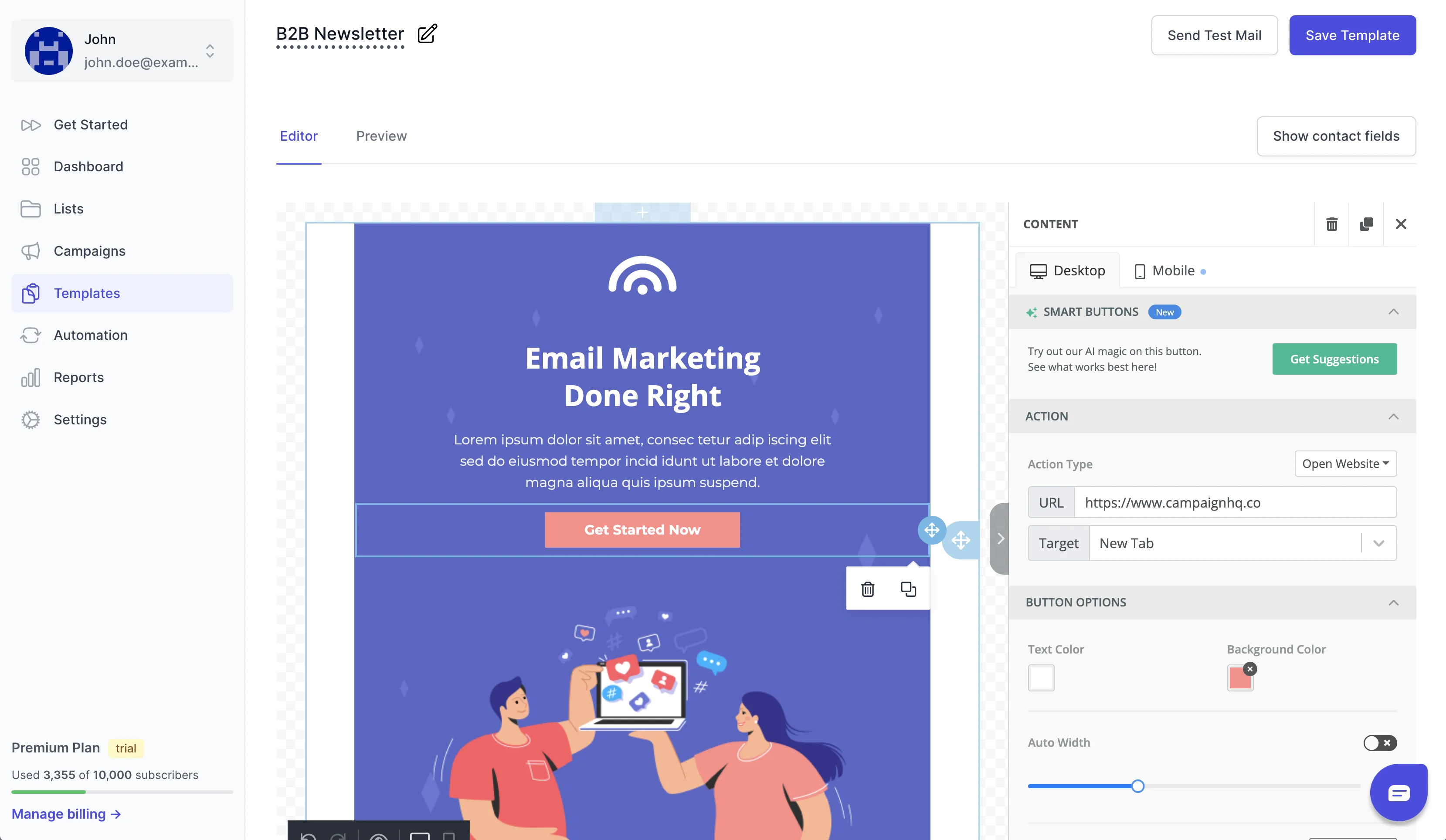
CampaignHQ is a marketing platform for email, WhatsApp and SMS on one contact database. The email builder is drag-and-drop with reusable blocks and saved templates for newsletters, promos and lifecycle messages, mobile and desktop previews, and HTML editing when you want full control. Segments decide who gets each issue, and journeys can follow up on a click with another email or a WhatsApp message on the same contact record.
It covers what WhatsApp-first tools do as well: a shared team inbox, no-code chatbots and broadcasts on the official WhatsApp Business API, from a Meta Business Partner. You can send through your own AWS SES or managed sending, verify lists before you send, and connect Shopify, Google Sheets or a CRM through the API and webhooks. There’s a 7-day free trial with no credit card.
Who it isn’t for: if you’re an independent writer and the newsletter is your business, a publisher tool like beehiiv or Substack gives you discovery and paid subscriptions that a business platform doesn’t focus on.
2. beehiiv
beehiiv is built for newsletter publishers. Its site lists a drag-and-drop editor, a no-code website builder with custom domains, automations, a referral program, a recommendations network for cross-promotion, segmentation and A/B testing of subject lines, a native ad network and paid subscriptions. Its free plan covers up to 2,500 subscribers.
Pick it if growing and earning from the newsletter itself is the goal.
3. Substack

Substack is a publishing platform for writers. You decide which posts are free and which are for paid subscribers, and Substack says writers keep 90% of their revenue, minus credit card fees. Readers subscribe to a publication rather than to a brand’s marketing list.
Pick it if you’re a writer who wants to start fast and doesn’t need much control over the design.
4. Ghost
Ghost is open source and funded by its users. It combines a website, publishing, email newsletters and paid memberships, and Ghost says publications earn revenue on it with 0% payment fees. Ghost sells hosting, and its site links a guide to installing Ghost yourself.
Pick it if you want your newsletter and website as one publication you own.
5. Kit

Kit, formerly ConvertKit, calls itself the email platform for creator business owners. It offers creator recommendations to grow lists, paid newsletters, digital product sales, paid recommendations and sponsorships, and visual automations for welcome sequences and launches.
Pick it if you sell courses, products or memberships to your audience.
6. MailerLite

MailerLite covers a drag-and-drop editor, an automation builder, landing pages, a website builder, signup forms and pop-ups, and paid newsletters and digital products. Its free plan includes a website, a landing page and a few forms and automations; RSS campaigns start on a paid plan.
Pick it if you want one simple tool for the newsletter, the signup page and a basic site.
7. Mailchimp

Mailchimp lists an email builder, templates, automation flows triggered by customer actions, segmentation by behaviour or purchase history, marketing reports, and more than 300 integrations including Shopify and WooCommerce. SMS is available on paid plans.
Pick it if your team wants a familiar email-first tool. Our Mailchimp alternatives guide covers what to compare if you’re thinking of moving.
8. Brevo
Brevo presents itself as email and SMS marketing with a CRM and automation platform. It suits teams that want a newsletter, text messages and simple contact management in one account. See our Brevo alternatives guide for the trade-offs.
9. EmailOctopus

EmailOctopus describes itself as “Email marketing. Nothing else.” It has a free plan with no credit card needed, a drag-and-drop editor, tags and segmentation, scheduled campaigns, automations, forms, an API and a large integration library.
Pick it if you want a focused email tool and nothing more.
How to choose your newsletter software
- Decide whether the newsletter is the product or a channel. That one answer cuts the list in half.
- Check where subscribers will live. If you already have customers in a store, CRM or app, the newsletter list should sit with them, not in a separate tool.
- Rebuild your real newsletter in each trial: your template, your signup form, one segment. Our guides to email template builders and email list management help here.
- Send a test to Gmail, Outlook and an iPhone, and check the domain authentication and the unsubscribe link.
- Look at the report. If it leads with opens, find out where clicks and conversions are.
- Price the plan at the list size you expect in a year, not today.
If you’re starting from scratch, our step-by-step guide on how to create a newsletter covers planning, content and testing, and email segmentation covers who should get which issue.
FAQ
What is the best newsletter software?
For writers and publishers, beehiiv, Substack, Ghost and Kit, depending on whether you care most about growth tools, simplicity, owning your site or selling products. For businesses, a marketing platform such as CampaignHQ, MailerLite, Mailchimp or Brevo, so the newsletter list sits with your customer data.
What is the difference between a newsletter platform and an email marketing platform?
Newsletter platforms are built for publishing: a web archive, discovery between newsletters and paid subscriptions. Email marketing platforms are built for businesses: segments, automated journeys, ecommerce or CRM data, and often other channels like SMS and WhatsApp.
Is there free newsletter software?
Yes. MailerLite, EmailOctopus and beehiiv all have free plans; beehiiv’s covers up to 2,500 subscribers. Check each plan’s sending limits and branding rules before your list grows.
Can I send a newsletter on WhatsApp?
Businesses can send newsletter-style updates on the WhatsApp Business Platform to people who have opted in, using approved marketing templates. Meta charges for each delivered template message, and the rate depends on the category and the recipient’s country (see Meta’s pricing page). Our guide to WhatsApp opt-in automation covers collecting consent.
How should I measure a newsletter if open rates are unreliable?
Use clicks, replies, unsubscribes and what readers do next, such as sign-ups or orders. Apple’s Mail Privacy Protection loads email content in the background, so opens overstate real reading.


