
 Vishal Singhal
Amazon SES lists outbound email at $0.10 per 1,000 emails on its à la carte rate. When you connect your own AWS account to CampaignHQ, you pay AWS directly for that sending, with no CampaignHQ markup.
New AWS customers can get up to $200 in AWS Free Tier credits, which can go towards SES (Simple Email Service). The platform keeps improving with new features like inline templates that make email campaigns better. CampaignHQ’s user-friendly dashboard combines with AWS SES to deliver robust email marketing tools and detailed analytics that track delivery, bounce, and open rates.
This piece walks you through AWS SES and CampaignHQ setup, domain verification, campaign creation, and proven practices that boost your email marketing results. The blog helps both newcomers and growing businesses make use of AWS SES and CampaignHQ effectively.
What is AWS SES and how does CampaignHQ make email sending easier?
AWS SES (Simple Email Service) is Amazon’s trusted cloud-based email service that helps businesses send marketing and transactional emails. AWS SES takes care of the complex infrastructure needed to deliver emails successfully while keeping high delivery rates.
CampaignHQ turns this powerful but technical service into a friendly email marketing platform. The easy-to-use dashboard lets me control AWS SES features without needing technical knowledge.
Making things simpler is CampaignHQ’s biggest strength. AWS SES works great for sending bulk emails but doesn’t have built-in campaign tools. CampaignHQ adds these essential features:
- Visual email builders with drag-and-drop functionality
- Contact management systems for segmentation
- Campaign scheduling and automation features
- Detailed analytics beyond simple delivery metrics
CampaignHQ handles all technical parts of SES setup, which saves substantial time. The platform takes care of bounce processing, complaint handling, and delivery optimizations that would need custom coding otherwise.
Marketers who care about delivery rates get the best of both worlds – Amazon’s resilient delivery infrastructure combined with CampaignHQ’s marketing-focused interface.
The integration lets me focus on creating compelling email content instead of dealing with technical details. Visit CampaignHQ to learn how they’ve made it easier to use AWS SES for effective email campaigns.
How do you set up and connect AWS SES with CampaignHQ?
The connection setup between AWS SES and CampaignHQ requires a few simple steps that anyone can complete without technical expertise.
You’ll need an AWS account to begin. The signup process on AWS’s website requires your email address, contact details, and billing information. A verification code will arrive on your phone to complete your registration.
The next step requires domain or email verification in AWS SES. Domain verification needs specific CNAME records added to your DNS settings. Email verification happens through a link sent to your inbox. This process proves you own the sending identity.
Your new AWS account starts in a sandbox environment with a limit of 200 emails per day. Production access requires a quota increase request. In the SES console, open the Account dashboard, choose View Get set up page, then Request production access. Say whether you mainly send marketing or transactional mail, add your website, and confirm you handle bounces and complaints. AWS Support gives an initial response within 96 hours.
Once you receive production access, create SMTP credentials through the AWS SES console. These credentials are different from standard AWS access keys.
Your AWS SES account connects to CampaignHQ through a straightforward integration process. The platform guides you through SPF, DKIM, and DMARC setup to support high delivery rates, with DNS validation for the records you publish.
What steps are needed to verify domains and ensure deliverability?
AWS SES requires domain verification to prove ownership and prevent misuse when you send emails through CampaignHQ. You need to add specific DNS records from AWS to your domain settings.
AWS SES will ask you to publish CNAME or TXT records to your DNS provider after you start domain verification. The verification can take up to 72 hours to complete. You must set up DomainKeys Identified Mail (DKIM) verification, which Amazon SES uses to confirm domain ownership.
These authentication protocols will help you achieve better deliverability:
- SPF (Sender Policy Framework): Prevents email spoofing by specifying authorized email-sending servers
- DKIM: Adds cryptographic signatures to emails
- DMARC: Combines both SPF and DKIM protocols
Low bounce rates are vital since AWS SES monitors them closely. AWS places an account under review at a bounce rate of 5% or more and may pause sending at 10% or more. Our SES dos and don’ts cover how to stay well below that.
Your deliverability will improve if you:
- Clean up invalid subscribers regularly
- Use double opt-in strategies to reduce bounces
- Add CAPTCHA to web sign-up forms
- Track bounce and complaint rates through Amazon SNS notifications
Virtual Deliverability Manager’s dashboard gives you a clear view of problem areas and suggests ways to improve your sending infrastructure.
Form not loading? Open it on our site.
How can you create, send, and track campaigns using CampaignHQ + SES?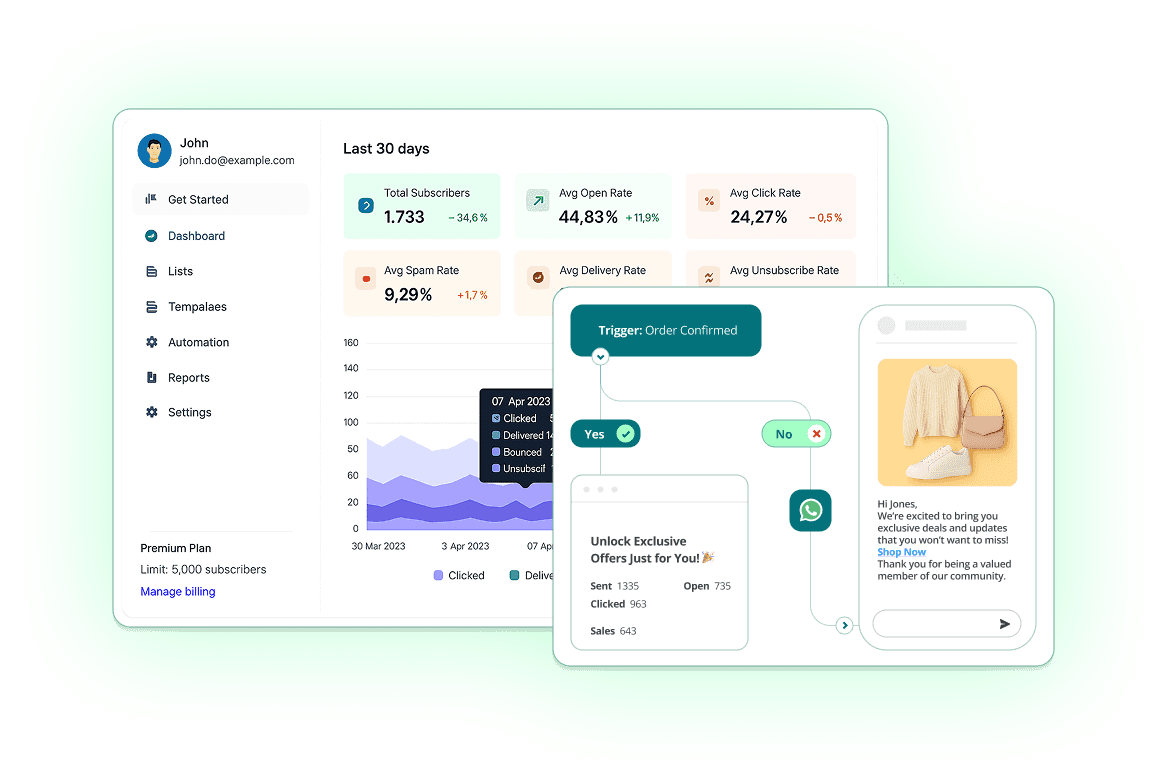
Setting up email campaigns becomes simple once you connect your AWS SES account with CampaignHQ. The platform has an accessible interface that lets you design emails with pre-built templates. You can also make custom ones using the drag-and-drop editor.
The campaign creation starts in CampaignHQ’s dashboard. You can name your campaign, pick your audience from contact lists and create email content. The visual editor helps customize fonts and images without coding.
CampaignHQ’s mobile and desktop previews show how emails look on different devices, and you can send a test email to your team before the campaign goes out.
You have the flexibility to send emails right away or schedule them at specific times. This timing can match your audience’s behavior patterns for better results.
The platform’s tracking features show its true value. The analytics dashboard displays up-to-the-minute data analysis:
- Open rates and timestamps
- Click-through rates with link-specific data
- Bounce and delivery statistics
- Unsubscribe trends
These metrics help make future campaigns more effective. CampaignHQ offers resources and support to discover the full potential of email marketing with this powerful combination.
What best practices and troubleshooting tips should you follow?
Your sender reputation matters a lot when you send emails through AWS SES using CampaignHQ. We picked our sending domain carefully: subdomains like marketing.example.com work best for promotional content while orders.example.com handles transactional messages. This setup helps build separate reputations.
Email deliverability depends by a lot on authentication protocols.
You’ll need these three core protocols:
- SPF (Sender Policy Framework) to prevent email spoofing
- DKIM (DomainKeys Identified Mail) for cryptographic message signing
- DMARC (Domain-based Message Authentication) combining both SPF and DKIM
Your list management just needs constant care. A double opt-in strategy helps cut down hard bounces from typing errors. You should handle bounces and complaints right away. Remove those email addresses and find out what caused the issue.
Even with opt-in procedures in place, keep an eye on your engagement metrics. Subscribers who don’t interact with your emails within your set timeframe should be removed. This helps you stay away from spam traps.
When delivery issues pop up, look at these common areas:
- Make sure you got successful responses from SendEmail or SendRawEmail requests
- Get into the sender’s email address and Return-Path validity
- Check the AWS Service Health Dashboard for known SES problems
- Think over temporary rejections (greylisting) that delay delivery
CloudWatch alarms work great to alert you about message rejection errors, throttling issues, authentication failures, and quota exceeded notifications.
Conclusion
AWS SES through CampaignHQ gives you Amazon’s sending infrastructure with a marketing interface on top. If you use your own SES account, you pay AWS directly for sending. The system might look technical at first, but CampaignHQ makes it available to marketers who don’t have specialized technical knowledge.
Domain verification serves as a crucial step that verifies your sending identity and builds the foundation for excellent deliverability. SPF, DKIM, and DMARC authentication protocols protect your sender’s reputation and ensure your messages land in intended inboxes instead of spam folders.
List hygiene needs careful attention because AWS SES watches bounce rates closely. Double opt-in strategies, regular list cleaning, and engagement tracking reduce the risk of account suspension from high bounce rates substantially.
The analytics dashboard shows practical information about open rates, click-through rates, and delivery statistics. You can refine your campaigns continuously for better results. This informed approach helps maximize ROI while building stronger relationships with your audience.
Start making use of this powerful email marketing solution by visiting CampaignHQ. You’ll find resources to help your email marketing efforts succeed.
AWS SES paired with CampaignHQ creates a strong setup for businesses that need reliable, adaptable email marketing. Amazon’s resilient infrastructure combined with CampaignHQ’s user-friendly interface lets you focus on creating compelling content rather than dealing with technical complexities.
FAQ
Let’s look at the most common questions about using CampaignHQ with AWS SES.
Do I need an AWS account to use CampaignHQ with SES?
Only if you want to send through your own SES account. In that case, the first step is creating an Amazon Web Services account, and CampaignHQ works with your existing SES setup. If you’d rather not manage AWS, CampaignHQ can send through managed SES instead. Your next step involves verifying identities through the SES console. Just select “Create Identity” and follow the verification steps for your email addresses or domains.
How does CampaignHQ improve deliverability compared to using AWS SES directly?
CampaignHQ adds the marketing layer on top of SES: guided SPF, DKIM, and DMARC authentication setup, automatic bounce and complaint handling, suppression lists, and reputation monitoring. Raw SES setup needs technical expertise for each of these. SES also offers its own Virtual Deliverability Manager dashboard if you want AWS’s view of your sending.
Can I track email opens, clicks, and bounces when sending via SES in CampaignHQ?
Yes! CampaignHQ gives you complete tracking metrics for open rates, click-through rates, delivery statistics, opt-out rates, and campaign performance. The system tracks individual recipients, so you know exactly who opened your emails or clicked links.
Can we buy CampaignHQ through AWS Marketplace?
Yes. CampaignHQ is listed on AWS Marketplace as a SaaS product, so teams that buy software through AWS can subscribe from their AWS account and see the charges on their AWS bill. You can also sign up directly on campaignhq.co.
Prefer to talk first? See how it works, or start a 7-day free trial, no credit card needed.


