
 Vishal Singhal
Need the best email blasting software? You’re not alone. Email marketing is still one of the most dependable ways to reach customers you already have.
My extensive testing of mass email sender tools has revealed solutions that work well for small businesses. You might need Brevo’s 9,000 monthly emails or prefer Sender’s larger 15,000 email allowance. Let me help you find the perfect platform that matches your needs.
What is an email blast service?
Email blast services let businesses send one email message to many recipients at once. These services have become vital tools that help small businesses reach wider audiences quickly.
Here’s what makes email blast services powerful for managing large-scale email campaigns:
- List management and segmentation capabilities
- Email design and template tools
- Delivery tracking and analytics
- Automation features
- Integration with other business tools
These services ensure emails reach their destination by following best practices and compliance requirements. The platforms excel especially when you have new products to announce, limited-time sales to promote, or policy updates to share.
Today’s email blast services do more than just send mass emails. They offer smart targeting options, but their core purpose stays the same – sending bulk emails to opted-in subscribers. Regular email marketing differs from email blasts in approach. Marketing emails target specific groups while blast emails reach broader audiences with time-sensitive messages.
Success with email blast solutions needs a strategic touch. Sending emails once per month to once per week works best. The results improve when you combine good list management with engaging content and track performance through analytics tools.
10 Best Email Blasting Software
|
Software |
Starting Price |
Key Features |
Notable Integrations |
|
Free trial, no credit card |
– Drag-and-drop builder – Automated journeys – Up-to-the-minute data analysis |
– AWS SES – API access – Zapier – Shopify – Hubspot |
|
|
Brevo |
– AI content generation – Predictive sending – Built-in CRM |
– Shopify – WooCommerce – WordPress |
|
|
MailerLite |
– Visual automation builder – AI content generation – Survey tools |
– Shopify – WooCommerce – WordPress |
|
|
Constant Contact |
– Product recommendations – Event management – Social media advertising |
– Shopify – WooCommerce – Etsy |
|
|
GetResponse |
– Visual automation workflows – AI content generation |
– Shopify – WordPress – Podia |
|
|
Sender |
– Drag-and-drop builder – Geotargeting – Live reporting |
– WordPress – WooCommerce – Shopify |
|
|
HubSpot |
– AI content generation – Smart CRM integration – Personalization tokens |
– Google Workspace – Slack – Shopify |
|
|
AWeber |
– 700+ templates – AI Writing Assistant – Web push notifications |
– WordPress – PayPal – Salesforce |
|
|
Moosend |
– Product recommendations – Abandoned cart recovery |
– WooCommerce – OpenCart – CS-Cart |
|
|
EmailOctopus |
– 30+ mobile templates – Visual automation – Landing page tools |
– WordPress – Zapier – Shopify |
1. CampaignHQ: Email, WhatsApp and SMS Together
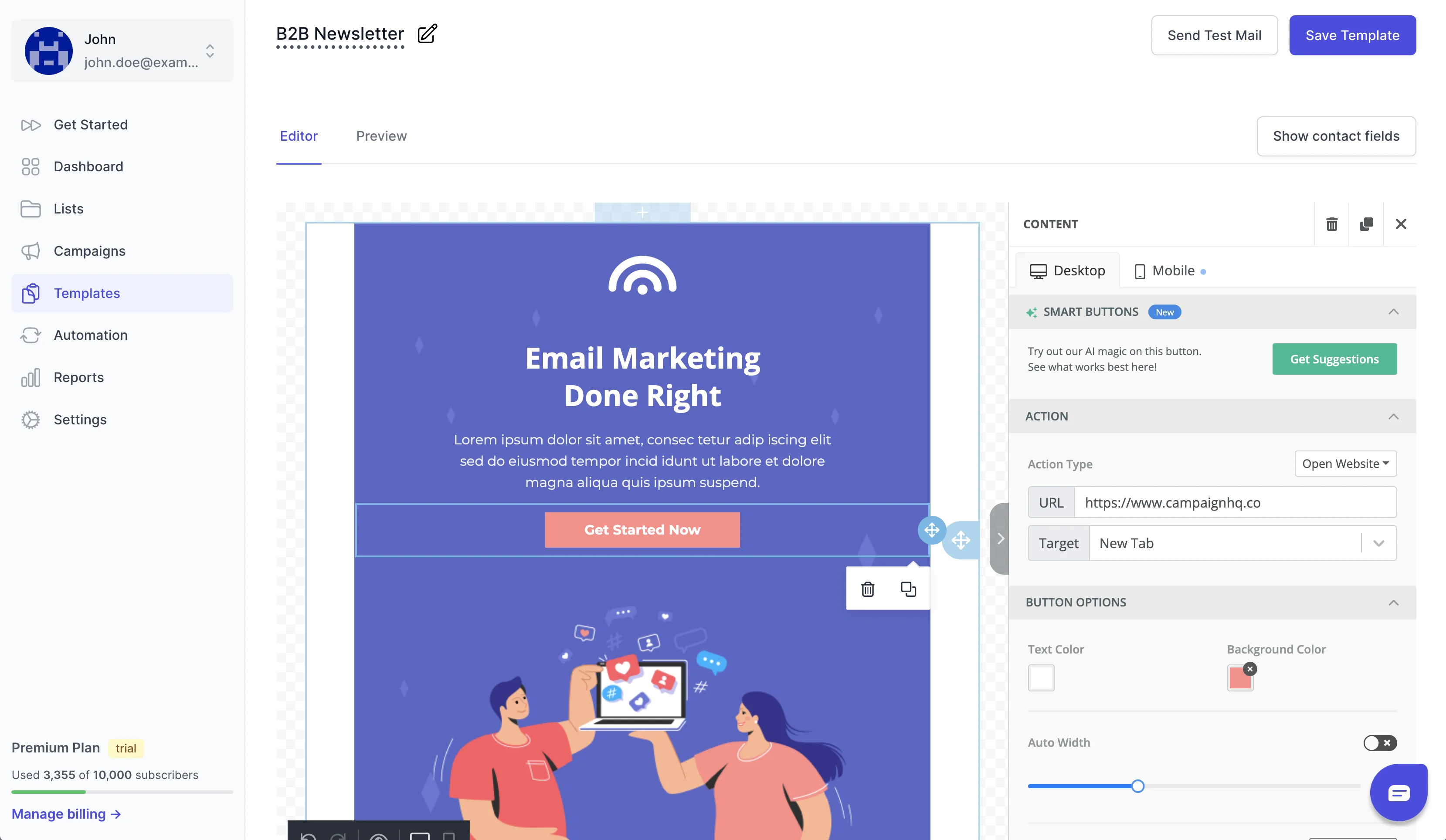
CampaignHQ is a powerful email marketing platform that also runs WhatsApp and SMS on the same contact database. We make CampaignHQ, so it is listed first. The software has detailed email automation tools.
CampaignHQ Features for Small Business
The platform’s drag-and-drop email builder lets you create responsive emails without coding knowledge. You can track key metrics like open rates, click rates, and unsubscribe rates with up-to-the-minute data analysis.
CampaignHQ Pricing and Plans
Pricing depends on the channels you use and how much you send. You can start with a free trial, no credit card needed, and send through your own AWS SES account or ours.
CampaignHQ Integration Capabilities
The platform gives you developer-friendly API access for custom integrations. We connected it seamlessly with AWS SES for businesses that prefer to use their own email infrastructure.
CampaignHQ Pros & Cons
|
Advantages |
Limitations |
|
Easy-to-use drag-and-drop interface |
Simple plans have fewer features |
|
Detailed analytics suite |
New users might find navigation tricky |
|
Email, WhatsApp and SMS in one place |
Template customization has limits |
|
Visual journey builder |
The platform gives you essential email marketing features for small businesses, and its strong automation capabilities and integration options work well for growing organizations.
Find the Best Email Blasting Software
Boost your email campaigns with the Best Email Blasting Software. CampaignHQ provides powerful tools to reach your audience effectively.
2. Brevo: Most Cost-Effective Mass Email Sender

Brevo stands out as an email marketing solution that gives you great value with its complete feature set and budget-friendly pricing. The company focuses on making email marketing available to small businesses.
Brevo’s Small Business Features
You’ll find a resilient drag-and-drop email editor that comes with AI-powered content generation capabilities. Users get predictive sending optimization and detailed heat maps that track engagement.
Brevo Pricing and Plans
Brevo’s pricing makes it different from others (current prices are on Brevo’s pricing page):
- Free Plan: 300 emails per day with unlimited contacts
- Starter Plan: 5,000 emails a month
- Business Plan: Adds advanced features
Brevo Integration Capabilities
The platform merges with popular ecommerce platforms and business tools. Users can connect with Shopify, WooCommerce, WordPress, and Google Analytics. The platform supports over 67 direct integrations, and you can make more connections through Zapier.
Brevo Pros & Cons
|
Advantages |
Limitations |
|
Unlimited contacts across all plans |
Limited direct integrations compared to competitors |
|
Built-in CRM functionality |
Simple reporting in lower-tier plans |
|
AI-powered content generation |
Customer support response times can vary |
|
Competitive pricing structure |
Small businesses love the platform’s advanced features like marketing automation and web tracking in its free plan. They can start with simple tools and grow as their needs expand.
3. MailerLite: Easiest Email Blast Software

MailerLite’s accessible interface is known for its ease of use. The platform shows its youthful design through simplified features and a responsive support system.
MailerLite Small Business Features:
The platform lets you create responsive emails quickly with its drag-and-drop editor – no coding needed. We used the AI-powered content generation tool and visual automation builder to great effect. MailerLite keeps things simple with a clean interface that has essential tools like landing pages, forms, and surveys.
MailerLite Pricing and Plans
The pricing structure has three main tiers (current prices are on MailerLite’s pricing page):
- Free Plan: Up to 1,000 subscribers and 12,000 monthly emails
- Growing Business: 500 subscribers with unlimited emails
- Advanced: Adds extra features
MailerLite Integration Capabilities
The platform connects with major ecommerce platforms like Shopify, WooCommerce, and WordPress. Advanced plan users can access Facebook audience integration and promotional pop-ups. The platform also works with Zapier, which makes shared work possible with thousands of apps.
MailerLite Pros & Cons
|
Advantages |
Limitations |
|
Modern templates with accessible drag-and-drop interface |
Free plan doesn’t include pre-designed templates |
|
Detailed automation features |
Paid plans only for custom domain publishing |
|
Stripe integration lets you sell digital products |
Fewer automation options than competitors |
|
Budget-friendly pricing |
Mobile app works only on iOS |
MailerLite stands out with its user-friendly approach. Small businesses looking for simple email marketing solutions will find it perfect for their needs.
Form not loading? Open it on our site.
4. Constant Contact: Best for Retail Business
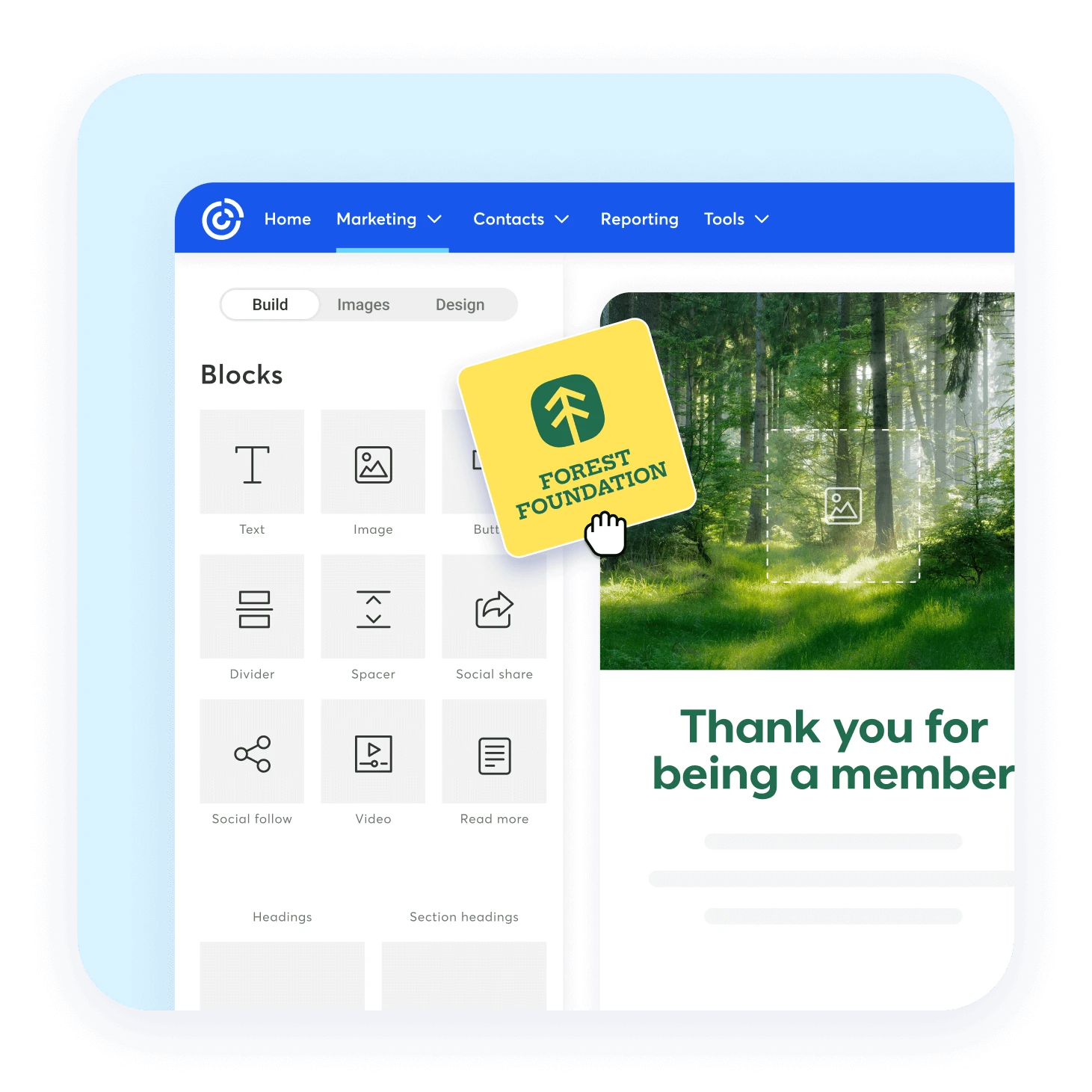
Constant Contact provides reliable email marketing features designed for retail businesses that want to promote products and connect with customers.
Constant Contact Small Business Features
The platform’s retail-centric capabilities include automated product recommendations and customer segmentation tools. Businesses can create and manage events, sell tickets, and handle registrations through integrated payment systems. An AI content generator helps craft compelling product descriptions and promotional content.
Constant Contact Pricing and Plans
You can choose from three pricing tiers (current prices are on Constant Contact’s pricing page):
- Lite: Up to 500 contacts
- Standard: Adds automation features
- Premium: Includes advanced segmentation
Constant Integration Capabilities
The platform supports over 300 integrations with a strong focus on retail connections. Businesses can connect with:
- Ecommerce platforms (Shopify, WooCommerce, Etsy)
- Social media management tools
- Payment processors (Stripe, PayPal)
- Event management systems
Constant Contact Pros & Cons
|
Advantages |
Limitations |
|
High deliverability rates across major email providers |
Higher pricing compared to competitors |
|
Complete event management capabilities |
Simple landing page customization options |
|
Large template library with retail-focused designs |
Limited automation features in lower-tier plans |
|
Built-in social media advertising tools |
Retail businesses looking for multichannel marketing and event management will find the platform’s features and reliable integration options valuable.
5. GetResponse: Best Automation Features

GetResponse stands out with its AI-powered features and smart marketing tools, backed by automation capabilities.
GetResponse Small Business Features
Businesses can create customized customer experiences through behavior-triggered emails with the platform’s automation suite. Users make use of AI-powered content generation and product recommendations to boost engagement. The system tracks and rates customer actions to target specific groups based on data and criteria.
GetResponse Integration Capabilities
The platform works with more than 170 popular business tools through direct connections. Businesses can build custom integrations for their specific needs using its open API. The system naturally connects with major ecommerce platforms, including:
- Shopify for customer and product data synchronization
- WordPress for newsletter creation
- Podia for course enrollment automation
GetResponse Pricing and Plans
The pricing structure comes in multiple tiers (current prices are on GetResponse’s pricing page):
- Email Marketing: Core email marketing
- Marketing Automation: Adds advanced features
- Ecommerce Marketing: Includes the complete toolkit
Users can try any plan free for 30 days without entering credit card details.
GetResponse Pros & Cons
|
Advantages |
Limitations |
|
Complete automation workflows with visual builders |
Big jump in price between simple and advanced plans |
|
AI-powered content generation and recommendations |
Lower-tier plans have fewer features |
|
24/7 live chat support in multiple languages |
Simple autosave functionality |
|
Wide range of integration options |
6. Sender: Best Free Email Blasting Service

Sender distinguishes itself from other email marketing platforms with one of the most generous free plans available. Users can send up to 15,000 emails monthly to 2,500 subscribers at no cost.
Sender Pricing and Plans
The Free Forever plan has unlimited automation workflows and segmentation capabilities. Users get access to:
- Free responsive email templates library
- Accessible drag-and-drop builder
- Popup and form creation tools
Sender Small Business Features
The platform’s feature-rich email builder lets users embed images, videos, and GIFs. We focused on personalization through geotargeting and dynamic content elements that create tailored messaging. The live reporting and newsletter heatmap give quick insights into campaign performance.
Sender Integration Capabilities
The platform connects smoothly with several popular services:
- WordPress
- WooCommerce
- PrestaShop
- Zapier
- Shopify
- Zotabox
- Pabbly
Sender Pros & Cons
|
Advantages |
Limitations |
|
Exceptional customer service with 24/7 support |
Sender branding on free plan emails |
|
User-friendly interface |
Email design restrictions with spacing issues |
|
Complete automation capabilities |
Limited segmentation options for beginners |
|
Good value for money |
The platform ended up maintaining high deliverability rates and shows up-to-the-minute data analysis through a single dashboard. Small businesses looking for affordable email marketing solutions will find Sender’s mix of features and pricing compelling.
7. HubSpot: Best CRM Integration

HubSpot combines CRM features with email marketing to create a single platform that manages customer relationships and marketing campaigns. Their Smart CRM helps businesses send automated email sequences right from their inboxes.
HubSpot Email Marketing Features
The email marketing toolkit has AI-powered content generation and drag-and-drop email builders. Users can create professional campaigns through:
- Bulk emails that work on all devices
- A large template library to reach customers
- Personalization tokens for targeted messaging
HubSpot Integration Capabilities
The platform works with over 500 external tools. Businesses can connect with:
- Google Workspace
- Slack
- Mailchimp
- Shopify
HubSpot Small Business Pricing
The platform has three main pricing tiers (current prices are on HubSpot’s pricing page):
- Starter: Core email and CRM tools
- Professional: Extra automation and reporting features
- Enterprise: For large teams
HubSpot Pros & Cons
|
Advantages |
Limitations |
|
Accessible interface that’s easy to use |
Higher-tier plans get pricey |
|
Marketing and sales hubs work together smoothly |
Premium features need subscriptions |
|
Complete automation features |
Mobile interface needs work |
|
Many customization options |
Managing duplicate data is difficult |
The platform maintains high delivery rates and offers detailed campaign tracking with customer behavior insights. Businesses can also use HubSpot’s API to create custom integrations that sync data between platforms.
8. AWeber: Best for Beginners

AWeber helps beginners become skilled at email marketing with its user-friendly design and complete learning resources. The platform maintains high deliverability rates.
AWeber Small Business Features
The platform’s drag-and-drop email builder makes campaign creation simple with over 700 professionally designed templates. Users get access to an AI Writing Assistant and pre-written email campaigns that help them start quickly. The platform has web push notifications and landing page builders to expand marketing reach.
AWeber Pricing and Plans
AWeber has four different subscription tiers (current prices are on AWeber’s pricing page):
- Free: Up to 500 subscribers with 3,000 monthly emails
- Lite: 10x subscriber sending limit
- Plus: 12x subscriber sending limit
- Unlimited: One flat rate for unrestricted usage
AWeber Easy Integration Capabilities
The platform combines smoothly with major ecommerce platforms through its API. Users can integrate with:
- WordPress to automate blog-to-email
- PayPal to build customer lists
- Salesforce to sync CRM
- WooCommerce to integrate stores
AWeber Pros & Cons
|
Advantages |
Limitations |
|
24/7 customer support through email, chat, and phone |
Some users report email deliverability issues |
|
Free account migration service |
Platform performs slower than competitors |
|
Large template library with 700+ options |
New users face a learning curve with navigation |
|
Complete knowledge base and video tutorials |
9. Moosend: Best for eCommerce

Moosend stands out as a powerful eCommerce marketing automation platform with strong email deliverability. The software shines with its sophisticated product recommendation system and abandoned cart recovery features.
Moosend Pricing and Plans
The platform keeps pricing simple and clear (current prices are on Moosend’s pricing page):
- Pro Plan: Unlimited emails
- Enterprise Plan: Custom pricing with additional features
- 30-day free trial available without credit card requirements
Moosend Small Business Features
Users can create stunning campaigns quickly with the platform’s drag-and-drop email builder. The system provides countdown timers and product blocks to boost engagement. Automation setup becomes easier with the visual workflow builder, which supports:
- Welcome email sequences
- Cart abandonment reminders
- Cross-sell/upsell campaigns
- Thank you emails
Moosend Integration Capabilities
The platform connects seamlessly with major eCommerce systems through native integrations:
- WooCommerce
- OpenCart
- CS-Cart
- Zen Cart
Moosend Pros & Cons
|
Advantages |
Limitations |
|
Advanced eCommerce AI capabilities |
Limited signup form options |
|
Up-to-the-minute audience segmentation |
No free plan available |
|
Customizable signup forms and landing pages |
Restricted flexibility in design |
|
Transactional email support |
Moosend’s Audience Discovery feature updates segments automatically based on funnel stage and purchase probability. This smart system helps target customers precisely through behavioral data analysis.
10. EmailOctopus: Most Affordable Option

EmailOctopus stands out as a budget-friendly email marketing solution that gives you everything you need without expensive pricing.
EmailOctopus Pricing Plans
The platform keeps pricing simple and helps you grow your business (current prices are on EmailOctopus’s pricing page):
- Free Starter Plan: 2,500 subscribers with 10,000 monthly emails
- Pro Plan: Unlimited emails
- Enterprise: Custom pricing for 500,000+ subscribers
EmailOctopus Small Business Features
The platform comes with a drag-and-drop email builder and over 30 mobile-friendly templates. Users can access visual automation builders to create advanced sequences. The system lets you:
- Use merge tags for personalization
- Build landing pages
- See immediate campaign results
- Create advanced segments
EmailOctopus Integration Capabilities
The platform works smoothly with several popular tools:
- WordPress integration
- Zapier connectivity
- Carrd compatibility
- Shopify synchronization
EmailOctopus Pros & Cons
|
Advantages |
Limitations |
|
Simple, low pricing |
Free plan emails show EmailOctopus branding |
|
Free plan offers generous limits |
Free plan reports last only 30 days |
|
Customer support team provides excellent live chat help |
Fewer direct integrations than other options |
|
Fair pricing that grows with your business |
The platform ended up maintaining high deliverability rates while focusing on email marketing basics. Your plan costs can decrease automatically when subscriber numbers drop.
Conclusion
Small businesses need reliable email marketing tools that balance features with affordability. I tested these platforms extensively and found each one brings different advantages to the table.
CampaignHQ stands out with its powerful automation and AWS integration. Brevo gives you great value through its free plan with 300 daily emails. MailerLite shines with its user-friendly design, and Constant Contact focuses on retail-specific features.
Start your email marketing trip today with CampaignHQ’s complete email marketing platform to get the best mix of features and value.
The right email blast software ended up depending on your business size, budget, and goals. You should start with free plans to test features before you pay for subscriptions. Your final choice should focus on deliverability rates, integration options, and how well the platform can grow with you.
Let’s explore expert answers to common questions about sending mass emails.
How can I create an email blast?
You need a reliable email service provider to start your email blast journey. We focused on importing your mailing list and designing your campaign with ready-made templates or from scratch. Your next steps should include spam and delivery tests to check performance. The final touch is picking the perfect time to schedule your campaign.
What is the best software for sending bulk emails?
Your business needs will determine the best choice. CampaignHQ stands out as a beginner-friendly option with its pre-made templates and automation features. Brevo gives you economical solutions with up to 300 free emails daily. Deliverability rates, template variety, and integration capabilities should guide your decision.
How to send 1000 emails at once for free?
Mass emailing platforms come with generous free plans. Sender lets you send up to 15,000 monthly emails to 2,500 subscribers. MailerLite gives you 12,000 monthly emails to 1,000 subscribers at no cost. Best practices and compliance requirements are crucial to maintain high deliverability rates.
What is the best email blast service?
CampaignHQ is our pick for detailed features based on extensive testing. Different platforms excel in their own ways – Brevo shines in affordability, MailerLite wins at user-friendliness, and Moosend dominates the eCommerce space. Your budget, technical expertise, and business requirements should shape your final choice.
Prefer to talk first? See how it works, or start a 7-day free trial, no credit card needed.


